
Vibe Coding From My Phone with OpenClaw
Wow, what a wild year it’s been! Claude Code was first released only a year ago, though it feels like it might have been a decade. The progress on LLM developer tooling has been unreal, and it really feels like there was a big shift a few months ago, around November, when Opus 4.5, Gemini 3 Pro, and GPT 5.1 all came out. These models were notably better than the previous generation. Around the same time, OpenClaw started to become wildly popular, and changed the way many people think about AI. With everyone talking about OpenClaw, and with @steipete joining OpenAI, I had to try OpenClaw for myself to see what all the hype’s about. (I want to learn more about AI tools and about what makes OpenClaw special, and I’ve always found that the best way to learn something is by just doing it.) And I’m not alone –1 even Andrej Karpathy had to give OpenClaw a go. I learned a lot along the way. Not only about OpenClaw, but about AI and LLMs in general, and I think some of it’s worth writing about!
Experimenting with Mobile Workflows
In the summer of 2025, before anyone had heard of OpenClaw or knew who Peter Steinberger was, I saw a tweet about VibeTunnel, and app that helps you connect your phone to your laptop so you can vibe code from your phone. I didn’t realize it at the time, but VibeTunnel was also created by Peter Steinberger, and it’s easy to see in hindsight how his early exploration with mobile vibe coding led to the OpenClaw experience he went on to develop.
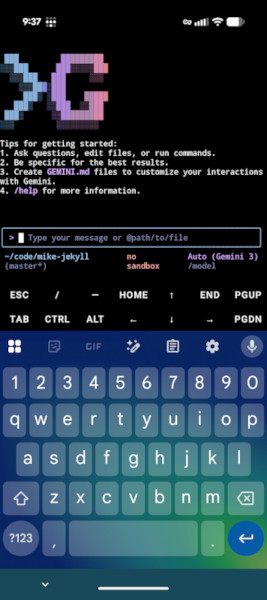
I never actually used VibeTunnel, though I did try vibe coding from my phone a few times. I found that I didn’t need VibeTunnel at all if I used Termux from my Android phone. I tried a couple different mobile coding setups, and my favorite was to use Termux as an SSH client while also connecting to OpenCode’s web server on my phone’s browser (all connected over Tailscale, of course, so I didn’t need to be on my LAN at home). Using dictation on my Android keyboard to write a prompt with my voice felt like an experience from the future. Still, there was a lot of friction with all the tedious set up required before you could actually start coding with that approach, so I didn’t find myself actually using it very often.
OpenClaw is different. OpenClaw feels magical because it’s just Telegram. You don’t need to set up an SSH server on your laptop or app on your phone, you don’t need to start a web server for a GUI in the browser every time you use it, and you don’t even need to be on Tailscale. It’s just messaging. And sending a message from your phone feels very natural. I think the lesson here is that AI works best when it fits well into an existing paradigm for human interaction.
OpenClaw First Impressions
The first time I tried to install OpenClaw, I gave up. I wrote it off as vibe-coded slop. (It is nearly 100% AI coded, but I no longer think it’s all slop. @steipete has shown how AI development can move at incredible speed with a stable core, even if there are some rough edges.) This was back when it was still called Clawdbot, in January 2026. My experience first experience with OpenClaw wasn’t great because I hit bugs and oddities in the software and the documentation. The setup wizard would almost work, but then I’d choose a less common option (like using a non-default model provider), and things would break. They wouldn’t necessarily break in a way that wasn’t fixable, but they’d break in a way that left you unsure if the setup had configured things correctly or not, and the docs weren’t much help either at that point. The Gateway server came with a settings page that had grown to contain so many settings it was unwieldy and almost completely unusable. The docs were (mostly, as I understand) written by AI, and they showed symptoms of this. Things like dozens of examples that sometimes contradict each other, or links to other sections of the docs that end up looping back to the place you just came from. To some extent, I think many of the bugs and idiosyncrasies I ran into were due to me not using the Claude Max plan (the most often recommended default) as my LLM provider. If you stayed on the paved road, everything probably worked great, but less common paths were difficult to get working. At the time, I wrote off OpenClaw as an over-hyped thing that would disappear in a couple weeks and moved on.
I probably wouldn’t have given OpenClaw a second chance if I didn’t listen to this Hackers Incorporated podcast episode where Ben Orenstein talks about having an experience nearly identical to mine, but then trying OpenClaw again with a slightly different approach and loving it. He mentioned that the settings page was awful, but said that instead you should just talk to your bot and ask it to update its own settings, or change whatever you need. This is a major lesson I learned from playing with OpenClaw, that it continues to reinforce in me. LLM Agents can do much more than write code. They can reconfigure and run things, including reconfiguring themselves. That’s a mindset shift that has application far beyond OpenClaw, and will probably affect the way I use a wide variety of AI tools going forward. After finishing the podcast, I decided to give OpenClaw another shot.
I’m pretty frugal, so I didn’t want to buy a personal Claude plan just to play with OpenClaw. But I also didn’t want to use a model that was so cheap it would lead to a bad experience. I bought $10 of credits on OpenRouter and set up OpenClaw with Kimi K2.5, a relatively new model that was getting a lot of praise for good performance while also being pretty fast and pretty cheap. My goal was to have a powerful enough model for a good experience while still staying within a modest budget. Like Ben, my second setup experience was much better. I’m not sure if it’s because I went in knowing what to expect with lower expectations, or because I used a different model, or because the software had gotten better and bugs had been fixed. Probably a mix of all three. In any case, got OpenClaw set up and connected to Telegram, and was able to start trying things from my phone.
The Magic of OpenClaw
Over the next couple of days using OpenClaw, I started to understand some of the things that make it feel magical. In a world where every other LLM tool is locked down, with approvals required at every step to read or write files or run simple commands, OpenClaw is the opposite. The approach is permissive by default. And while that’s indeed dangerous, it’s also a big part of the reason why OpenClaw feels different. It doesn’t bother you to approve every step of a simple task, it just does it. It can modify it’s own settings. It can even modify its own source code. It can access all of your files. Initially if feels scary, but over time you realize that getting things done requires lots of permissions. This is another lesson OpenClaw taught me. In some ways, I think agents are like power tools. They can be very dangerous if you don’t have much experience using them. But when you understand how to drive the agent well, where the risks are, and how to protect against them, you can become more comfortable running an agent with fewer restrictions.
Because OpenClaw is permissive by default, it can also run pretty much any tool you give it, and can even install its own tools. I didn’t really realize until I’d done it a few times, but in a world where some LLM tools are asking permission to visit a webpage, it’s a game-changing experience to have an LLM use CLI tools to setup other CLI tools and skills and immediately use them. In one experience, I’d seen @steipete tweet about gifgrep and decided I wanted to try it with my own Claw. I sent my Claw a message over Telegram to install it with brew and add a skill for itself to use gifgrep in chats. I was utterly astonished when it replied several seconds later with a SUCCESS gif!
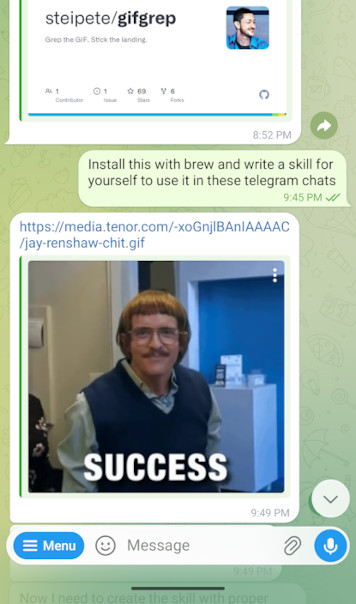
This shouldn’t have felt as strange as it did, but in some ways it blew my mind. It broke my mental model of what an LLM agent is capable of. I was used to thinking of an LLM agent as something that could spit out code that I’d then review, tweak, and run myself. But when you give an agent all the tools it needs, it can just do things on its own. In this case, it can find relevant info on websites, install a new CLI tool, write itself a skill about how to use the thing it just installed, and then use it in the first reply back to you, all without any human interaction. It makes it feel like we’ve only begun to scratch the surface of what LLMs will be capable of, and shifting my mental model to let agents do more is another lesson I learned from OpenClaw. LLM agents can do way more than you probably think they can, and you’ll be way more effective at using them if you assume they can do things.
Using OpenClaw for fun continues to shape the way I think about and interact with LLMs, and I think it makes me much more effective at using AI tools to write code at work. A few weeks ago I was flying on United, who offers free messaging on in-flight wifi. So of course, I couldn’t miss the opportunity to try working with OpenClaw from a plane! It worked on the first try; there was nothing tricky to set up (because it’s just Telegram). With Access to OpenClaw through Telegram, I could not only search the web (via text), but could also have it do things like download software and tools, and even write code. It’s a really interesting constraint to have no tools directly available to me (or even internet access) besides the model itself. Like many other times with OpenClaw, I learned something from the experience. I learned to rely on the model much more heavily. To have it find information for itslef. To tell it to go look for things and summarize info for me so we could make decisions together. I wouldn’t want to always work without my own web browser and tools, but being forced to do it for a little while taught me again that I can rely on the agent to do more work on it’s own than what I’m used to.
Running OpenClaw Safely
Obviously, security is a huge concern when running OpenClaw. There’s a balance here: OpenClaw is so powerful in part because it has unrestricted access to a lot of things, and doesn’t need approval to take most actions. I think reasonable security and safety with OpenClaw boils down to a few important factors:
- Run it in an isolated environment. An old computer in your basement is probably better than your primary laptop. The computer itself should of course have good security (only you can log in, and use something like Tailscale if you need to connect from outside your own LAN).
- Don’t let others chat with it. Keeping the chat interface locked down reduces the attack surface area greatly. It wasn’t built to chat with untrusted people.
- Run a powerful enough model. It’s been shown that bigger and better models are inherently more secure against prompt injection.
To run OpenClaw in a way that felt secure enough for me, I decided not to run it on my primary laptop. Instead, I put a fresh install of Ubuntu on an old laptop I had sitting in my closet, and I’m now treating that old laptop like a server to run OpenClaw 24/7 on a dedicated machine. This is great because I’m not worried about giving OpenClaw access to anything it wants in the filesystem.
Aside from where OpenClaw runs, it’s also important to think about how you connect to it. The old laptop I have running OpenClaw is on my home network, and the only way to access it from outside my LAN is Tailscale. Tailscale is awesome here, it’s the perfect solution for securely accessing a server on your home network like this. My Claw is set up to use Telegram for messaging, and is configured to only work in DMs with me. This is all straight out of the OpenClaw docs and wizard, and is roughly what OpenClaw recommends for a simple and secure setup. Importantly, it keeps the attack surface small by not opening up messaging to my bot from untrusted sources.
Running OpenClaw Cheaply
Like I said before, I’m frugal, and I didn’t want to spend hundreds of dollars testing out OpenClaw. This was a little tricky to figure out because for a long time it seemed like everyone was on the Claude Max plan, and info about cheaper ways to run OpenClaw was scarce. But it’s totally do-able to run OpenClaw very cheaply – the two most important factors are choosing an inexpensive model and configuring heartbeats.
Luckily, OpenClaw supports a wide variety of platforms right out of the box, so the hardest part was fiding a model that’s good enough to run well without breaking the bank. There’s pretty broad consensus right now that Kimi K2.5 hits a sweet spot here, so I started with that (on OpenRouter). It’s $0.45/M input tokens and $2.20/M output tokens. This pricing is reasonable enough that I rarely spend more than a couple dollars per day on busy days, and spend almost nothing when I’m not using it. I like OpenRouter because I only pay for what I use (which isn’t that much), and it makes it easy to experiment with different models from any provider. After spending $10-20 for lots of chatting and setup in the first several days, I’m probably averaging only a couple dollars per month now.
It’s worth noting that your default model doesn’t
need to be your only model. It’s easy to run /models in Telegram, which
will present you all the model options you’ve configured. You can switch to GPT
5.3 or Opus 4.6 to handle heavy coding, and then switch back to a cheaper model
for easy daily tasks when you’re done.
Aside from configuring the model, it’s important to know about heartbeats to keep costs down. Heartbeats run every 30 minutes by default – they’re just a quick check to see if any tasks need to be done. But they do use an LLM to check on things. If the heartbeat is running every 30 minutes with an expensive model, it’s easy to quickly rack up expenses without realizing what’s happening. I configured my heartbeats to run with an even cheaper model, and to poll less frequently (every 90 minutes). This keeps the cost of heartbeats near zero for me.
Looking Ahead
Peter Steinberger has said that one of his most important goals is to inspire people (while having fun along the way). I think he’s succeeding – he’s certainly inspired me! Even though I haven’t even used OpenClaw for anything serious, I’ve learned a lot very quickly by using it, and it’s changed the way I think about LLM tools. Interacting with OpenClaw feels like speedrunning a crash course on effective LLM use. It forces you to use the LLM for things you hadn’t thought of while also showing you it can do things you hadn’t dreamt of. Some of the lessons I’ve learned along the way are:
- Find ways to interact with LLMs that feel natural, like Telegram or voice.
- Don’t be too scared to remove some guardrails.
- Let the agent do things besides just writing code.
- Let the agent modify its own settings.
- Have the agent improve its own workflow, including memories and docs.
- Agents can use any CLI tools we can use, and CLI tools might be better than an MCP for some tasks.
- Build yourself some custom tools with AI. The cost to build a simple tool you want is near zero!
About the Author

👋 Hi, I'm Mike! I'm a husband, I'm a father, and I'm a staff software engineer at Strava. I use Ubuntu Linux daily at work and at home. And I enjoy writing about Linux, open source, programming, 3D printing, tech, and other random topics. I'd love to have you follow me on X or LinkedIn to show your support and see when I write new content!
I run this blog in my spare time. There's no need to pay to access any of the content on this site, but if you find my content useful and would like to show your support, buying me a coffee is a small gesture to let me know what you like and encourage me to write more great content!
Related Posts
- Vibe Coding in The World's Largest Hackathon: Building GPXTrack.xyz 29 Jun 2025
- Vibe Jam 2026: Astropilot VR 04 Jun 2026
- Hacking with Claude on a $27 Smart Watch 19 Aug 2026