Vibe Jam 2026: Astropilot VR
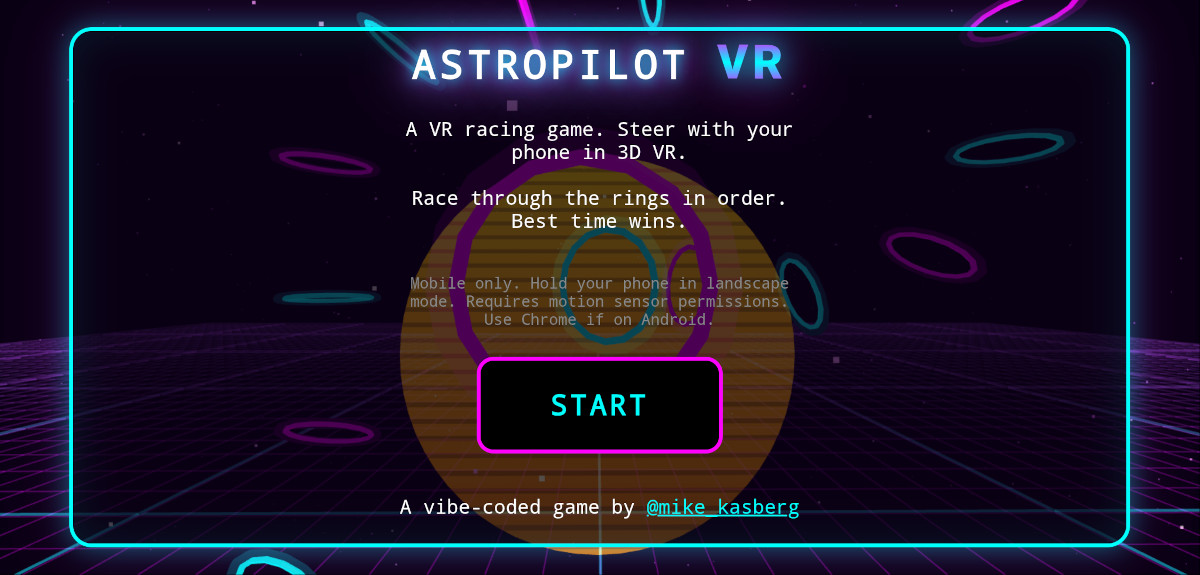
Astropilot VR is a 3D VR game for mobile phones that I vibe coded in a single weekend, as part of Vibe Jam. The game is a single HTML file (with embedded JS) that’s about 5,000 lines long, built primarily with Kimi K2.5 in OpenCode. I think the game’s really fun to play, and I hope you give it a try, but here I want to focus on the technical aspects and the vibe coding experience. I was pretty surprised what I could accomplish with a single HTML file:
- 180 kB (37kB compressed)
- Uses Three.js to render the 3D environment
- Runs on mobile phones (Chrome on Android or Safari on iOS)
- Uses mobile phone orientation as the game controller
- No downloaded assets
- Programmatic audio for game music
- No build
My own skills with AI have grown most rapidly in the past when I forced myself to use AI in ways that felt uncomfortable, pushing far beyond the guardrails of what I’d consider safe to do at my day job. Last year, I used the Bolt.new hackathon to build gpxtrack.xyz, and got way more comfortable with AI in the process. Vibe Jam seemed like a great excuse to try something similar this year!
As a father of two young kids, it’s hard for me to find time for personal side projects. When I first saw the Vibe Jam tweet from @levelsio, I dismissed it because I thought I wouldn’t have enough time to build anything worthwhile.
🕹️ THE VIBE JAM IS BACK!
— @levelsio (@levelsio) April 2, 2026
I present you...
🌟 2026 @cursor_ai Vibe Coding Game Jam #vibejam
Sponsored by @boltdotnew + @cursor_ai
Start: Today!
Deadline: 1 May 2026 at 13:37 UTC, so you have a whole month to make your game!
REAL CASH PRIZES:
🏆 Gold: $20,000
🥈 Silver:… pic.twitter.com/zvJHxYH2zR
But as luck would have it, my wife was going to be out of town for a weekend with my 5-year-old, leaving me alone at home with my two year old during Vibe Jam. My two year old naps for about two hours a day and goes to bed at 7pm. By staying up ‘til 11pm or midnight, I had six or seven hours a day to dedicate to vibe coding my game! I figured that might be enough to give it a shot, and I started thinking about what kind of game I might be able to vibe code in a single weekend!
My inspiration for the game came from a few different places. Pieter Levels is infamous for his single file (index.php) approach to websites, and he took a similar approach when vibe-coding fly.pieter.com. I thought this would be a fun constraint that also kept things simple (no build), so I wanted to try it. I initially wanted to build a drone racing simulator. Racing drones use VR-like goggles to show the drone’s FPV camera, and I wondered how close I could get to an experience like that using JS APIs on a mobile phone. As it turns out, the modern JS orientation sensor API is excellent, and is totally capable of creating an immersive VR-like experience (once you figure out how to use it).
Prototyping
At first, I wasn’t even sure if it would be possible to build what I was envisioning using JS APIs. I started prototyping with OpenCode on Friday evening, and immediately ran into a problem: The Device Orientation API requires https. Luckily, this is an easy problem to solve with AI. In under a minute, I had some self-signed certs and a Python https server. And I had a proof of concept web page that rendered a Three.js 3D environment with camera controls hooked up to the Device Orientation API! I was thrilled with how quickly AI helped me overcome the first hurdle.
It was hard to tell whether the device orientation sensors were controlling the camera correctly because I didn’t have anything to look at. And I was also worried about whether a mobile phone would be able to render a sufficiently complex 3D scene and read the orientation sensors precisely enough to feel like a game without lag. I asked the AI to generate a simple scene in Three.js so I’d have something to look at. I’m not sure what I was expecting, but I was blown away by how well the LLM did this. It knows Three.js and clearly had good examples in its training data, because it generated a “simple debugging scene” that would’ve taken me hours to construct, using well-spaced and nicely sized objects with surprisingly good colors and textures. And although my axes were initially misconfigured so things didn’t always move the right way, I could tell that lag wouldn’t be a problem. I’d generated a working proof of concept in about fifteen minutes, and I’d proven to myself that I could build a good gaming experience on a mobile phone with these tools!
I spent the next hour trying to fix the orientation sensor with OpenCode, and went to bed unsuccessful. Device orientation is a deep rabbit hole, and I had the LLM explaining concepts like quaternions to me. Although the LLM was good at explaining 3D concepts, it repeatedly failed to wire the Three.js camera to the device orientation correctly. Getting rotation working in one direction would break rotation in another direction, and I kept running into problems with gimbal lock and discontinuity at the +/- 180o boundary.
I came back the next day with fresh eyes, and in a new context window asked the API some pointed questions about the higer-level direction and concepts. As it turns out, the prototype had been using the Device Orientation API this whole time, which uses Euler Angles – leading to all the problems I was running into. Using the newer Relative Orientation Sensor API finally helped me achieve the immersive experience I wanted, with all the angles working correctly! This was a major breakthrough, and removed the blocker to actually getting something working! Kimi K2.5 had reasonably good knowledge of 3D fundamentals, but seemed to lack trained understanding of the (fairly new) Relative Orientation Sensor API and how that coordinate system (+Z coming out of the phone screen) maps to Three.js. Once I figured out how it all worked, I had Kimi add a few notes about it to AGENTS.md, and that really helped the AI stay on track with subsequent work.
Building with AI
With my phone controlling camera orientation correctly in Three.js, I was excited to start iterating on the actual game. I already had a concept in my head. A thrust lever on the right side of the screen would control speed/acceleration, and the camera would just move forward at that speed in whatever direction it was pointing. To start simply, the course would be defined by rings that you have to fly through. I outlined my ideas in a paragraph or two, and that single prompt got me to a playable prototype that I could start iterating on! I gave it a try, and was immediately hooked on the steering concept. I was smiling ear to ear as I tested the game. Steering by moving your phone in physical 3D space was fun, and I knew I had a really good foundation to build on.
With all the fundamentals in place, the next thing I needed was a race course. AI is good at a lot of things, but generating drone race courses in 3D space is not one of them. It could handle simple things like “start with a right turn and a straight”, but repeatedly failed to generate a complex and interesting course, and seemed to struggle more further from the origin. So, after several failed attempts at course generation, I leaned on one of my favorite AI dev patterns and had it build me a developer tool instead. AI sucks at generating 3D race courses, but it’s astonishingly good at generating level editors! I wrote a fairly detailed prompt, and asked it to build a level editor in a single HTML page that would save the course as JSON with points and orientations for each ring. It absolutely nailed it! I felt like I was playing my own version of Roller Coaster Tycoon as I spent the next half hour building and tweaking my own 3D race course.
Hers a gameplay video pic.twitter.com/CDywQaJ9CW
— Mike Kasberg (@mike_kasberg) April 13, 2026
Iterating on Gameplay
With a working race course, I started playing the game a lot to get a feel for it. It was really fun, but I noticed some things that require some paradigm changes to fix:
- Going off course was a problem. Without walls, you just fly off into space, and it’s very hard to get back on course.
- I wasn’t using the speed control at all. My simplified game physics allow you to fly in whatever direction you’re pointing, so there’s no point slowing down.
- When I knew the course well, my times were nearly identical if I had a good run, because I’d just fly at max speed the whole way.
I tried a lot of solutions to these problems. (AI makes prototypes so cheap!) I implemented a solution that put you back on the course after missing a ring, kind of like Mario Kart. I experimented with different (and some very fast) maximum speeds, and different acceleration limits. I experimented with different physics (momentum) simulations that would make it harder to turn at faster speeds. Ultimately, I didn’t like any of them. None of the variations I tried were as much fun as my original simulation with simple, silly-but-fun physics. I had the most fun when I was just trying to stay on the course at a speed that was barely manageable, with my turning ability limited only by how fast I could turn my phone in the real world. That’s when it clicked! This wasn’t actually a racing game. This game was more like Flappy Bird, where the whole point of the game is to stay on course as long as you can. That solved every problem I was having and simplified the gameplay! You don’t need to reset after going off course because the game’s over (but you can try again). You don’t need to control your speed because it’s just constant (almost too fast to control). You don’t need to worry about time because the goal is to see how far you can go without crashing. I decided to pivot, and implement a game closer to Flappy Bird mechanics.
In a world without AI, it probably would have taken me 8 hours or more to plan and implement a refactor of this magnitude. With AI, it took me about ten minutes to write a detailed prompt, and everything basically worked with a single prompt. I knew there might be a few minor bugs, but I was planning to iterate and add polish anyway, so I’d find and fix any bugs that were introduced. Being able to completely overhaul the gameplay this quickly was another thing that AI enabled, that wouldn’t have been possible a couple years ago.
Randomized Course Generation
With the new game mode, I realized I needed to have random course generation. It wasn’t fun to memorize a course and do it over and over again; there needed to be a randomized element of luck and surprise. It’s easy to implement naive random course generation, but I found it very difficult to implement random course generation that’s actually fun, interesting, and playable. After some failed experiments, I realized what I really wanted wasn’t completely random course generation. I really wanted to randomly assemble the course from some basic primitives – again, similar to Roller Coaster Tycoon. A helix or corkscrew is an important part of the course, but would never be generated randomly.
Implementing random course generation from a set of primitives in 3D space was near the limit of Kimi’s capabilities. The AI “knew” a lot about 3D space, but was fundamentally unable to “reason” in three dimensions. It could generate a 90 degree turn because it had been trained on many of them. And it knew all the relevant algorithms for transformations and rotations. But it struggled to combine these concepts in meaningful ways. As a result, I had to move slower and validate the output more carefully, and I even read a few parts of this code to understand what the AI was doing and point it in a different direction when necessary. When I started building this game, I chose to lean heavily into a hardcore version of vibe coding when I chose to write a single HTML file without tests. And while that was a fun constraint, I felt the limitation most painfully while working on this course generation. Working with unit tested JS classes in separate files would have absolutely been better here, because it would have given the AI a feedback mechanism to prevent regressions while working with 3D geometry. Although it was a little painful without those tests, after some more debugging I had a working implementation for course generation from randomized segments, and I love the way it turned out!
Flappy Bird, in 3D VR, in Space, for your phone! Free to play! 🐦🚀
— Mike Kasberg (@mike_kasberg) May 1, 2026
Vibe coded in a single 5,000 line file with plain HTML and JS, mostly in a single weekend. With @threejs , of course!
Super fun to build, and fun to play!#vibejam pic.twitter.com/H2lIEEbShk
The game turned out awesome, and I still find it fascinating that you can build a modern 3D mobile game in 5,000 lines of HTML and javascript – with, or even without AI. I thoroughly enjoyed the ability to see my changes immediately in a browser, without building or transpiling anything.
AI Learnings
One of my main motivations for building Astropilot VR was to allow myself some freedom to use AI dev tools in silly, dangerous, or non-standard ways, and by doing so learn how to use AI tools more effectively. For that goal, I think this project was a massive success.
Working on a Budget
I have basically unlimited AI tokens at work, but I don’t use my work AI subscription for personal projects. And while I could spend $20 for Claude Pro (or even $200 for Claude Max), I don’t really want to. I might use $20 of tokens some months (like when I’m vibe coding an entire game in a single weekend), but I don’t use $20 of tokens every month, and don’t want a $20 recurring subscription when I’m not getting that much value out of it. There are some free options, but they tend to have very limited models and token budgets. Ultimately, I chose to use Kimi K2.5 on OpenCode Zen to build Astropilot, and it worked great. Kimi K2.5 seems to fall somewhere between Claude Sonnet and Opus 4.5, which was good enough for me! Importantly, it’s cheaper than Claude by a factor of 5 (in OpenCode Zen pricing as of April, 2026)! I spent about $20 worth of OpenCode credits on Astropilot – possibly near the break-even point for a $20 Claude plan, though I’m not sure since I probably would have hit some rate limits on the Claude plan. Overall, I was really happy with Kimi K2.5, and I’d use it (or K2.6) again!
Feedback Loops
The feedback loop is critical. It’s funny, I wrote about short feedback cycles for humans all the way back in 2019. Today, it turns out feedback loops are perhaps more important for AI than they are for humans. Pretty early in Astropilot development, I ran into a console error that broke the game. But it was tricky to debug, because the game was running on a mobile phone browser (served from my laptop over my LAN). There’s a way to open developer tools on a laptop for a mobile phone that’s connected over USB for debugging, but it’s tedious and error-prone. Instead, I asked the LLM to implement a client-side logging mechanism to send JS errors back to the server, and a server endpoint to receive the logs and write them to a file. Now, the LLM can check the logs itself immediately, without waiting for me! LLMs need feedback, so finding a way to get a short feedback loop that lets the AI assess its own performance or fix its own errors is critical!
AI-Generated Tools
Having the AI generate tools for itself is one of the funnest techniques I’ve found for working with AI, and it’s an awesome escape hatch for certain situations. Just a single prompt is often enough for the AI to build a working tool. And the best part is, you can truly vibe code the tool, even if you’re working on important production code. Don’t look at the tool code (assuming it’s not dangerous), don’t test the tool code (aside from using it). It either works, or you ask the AI to fix it. While working on Astropilot, I had the AI generate tooling to help me read logs from the phone, edit 3D race courses, and debug random course generation. Sometimes, if you hit a situation where the AI can’t do something well, it would be really good at generating a tool that can do it well.
Programmatic Audio
I was astonished at how good Kimi K2.5 (or probably any modern LLM) was at writing code to generate programmatic audio. I gave it a short sentence like “Add a programmatic synthwave audio soundtrack to the game”, and it did exactly what I wanted on the first try. I followed up with a couple tweaks, like randomizing some of the instruments on each loop, which it also nailed. I had no idea any of this was possible, and perhaps it’s so impressive to me because I would have had to spend hours reading about this before even knowing where to start if I wanted to try this myself. But apparently the Web Audio API is excellent, and LLMs are good at using it.
Design
I’m not a particularly good designer. It often seems like it takes a lot of effort for me to get to a simple design that doesn’t feel like garbage. AI helped me a lot with the look and feel of the game. I was able to describe a vibe I wanted (synthwave), and the AI generated colors, borders, text gradients, and other styles that would have taken me days to get right. I did need to guide it, like telling it to match the style of the border it created five minutes earlier, and keep things consistent. But it was much easier for me to refine the designs after letting the AI handle the first pass than it would have been for me to design everything from scratch!
Handling Limitations
Sometimes, the AI is unable to perform the task you asked it to do. I ran into this most often when asking the AI to work on tasks that included 3D spatial reasoning, like course design. But I also encountered it in a few other areas of the code, like figuring out the right way to wire up the newest orientation sensor API to Three.js. When the AI is failing at something, it will happily continue to endlessly burn tokens, argue with itself, and tell you you’re absolutely right. I learned to recognize when it’s failing, and to think about why it’s failing, and to take a step back to try a different approach to the problem that works around the AI limitation.
What’s Next
Astropilot VR is published at astropilot.mikekasberg.com, and I’ve decided to make the source code available at mkasberg/astropilot-vr under the MIT license. This project was always about learning for me, so it feels right to let everyone see the source code and do whatever they want with it. I might continue to work on this after the competition ends, or even clean up the code (with AI), but I’ll always keep the original version tagged for reference.
About the Author

👋 Hi, I'm Mike! I'm a husband, I'm a father, and I'm a staff software engineer at Strava. I use Ubuntu Linux daily at work and at home. And I enjoy writing about Linux, open source, programming, 3D printing, tech, and other random topics. I'd love to have you follow me on X or LinkedIn to show your support and see when I write new content!
I run this blog in my spare time. There's no need to pay to access any of the content on this site, but if you find my content useful and would like to show your support, buying me a coffee is a small gesture to let me know what you like and encourage me to write more great content!
Related Posts
- Vibe Coding in The World's Largest Hackathon: Building GPXTrack.xyz 29 Jun 2025
- Vibe Coding From My Phone with OpenClaw 20 Mar 2026
- Hour of Code 2017 09 Dec 2017